In your control panel, go to Storefront > My Themes, and click the blue "Customize" button to launch Theme Editor.
In the left hand column of the Theme Editor, click the panel labelled 'Global Theme Settings'.
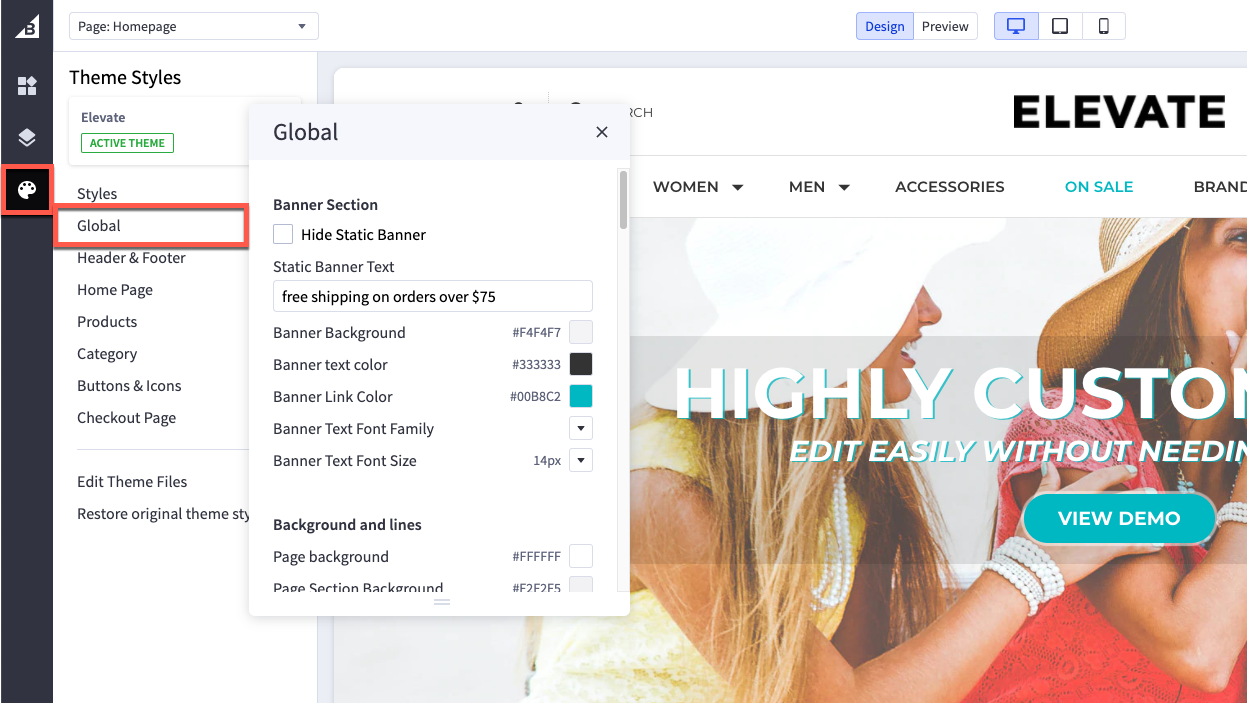
Banner Section
| Hide Static Banner | If selected will hide the top banner bar |
| Static Banner Text | Type the text you want to display in the top banner bar |
| Banner Background | Set background color of top banner bar |
| Banner Text Color | Set the text color |
| Banner Link Color | Set link color |
| Banner Text Font Family | Set the font family for the text in banner bar |
| Banner Text Font Size | Set font size |
Background and Lines
| Page background | changes the background color of the overall site. It does not change the color of the header or footer backgrounds |
| Primary line | changes the color of lines that divide header, footer and product description |
| Common dark background | the color of the overlay when using quick view |
| Modal overlay background | changes the color of dark backgrounds such as the block that appears when a shopper adds a product to the cart |
| Alert popup box background color | changes the color of popup messages and alerts |
| Horizontal lines | color of lines that divide header, footer and product description |
Body Text and links
| Body text font family | font face to use for body text |
| Body text font size | font size to use for body text |
| Body text color | Colour of the main body text |
| Body text hover color | affects the color of text, such as Logo Text, when you hover a cursor over it |
| Secondary text color | changes the color of text used as subtitles, such as the links in the footer, the price of the product on the home page, and category breadcrumbs |
| Secondary text hover color | affects the color of text such as the text in the footer when a cursor hovers over it |
| Link color | hyperlinks created on webpages will have this color |
| Link hover color | the color displayed when a cursor hovers over a link |
| Link active color | the color that displays when a user clicks a link. This may display quickly and may not appear at all on some browsers. |
Page Headings
| Page Heading font family | Select the font face to use for all headings |
| Heading 1 | changes the size of large titles, such as the title of a Category or the Featured Product section on the home page |
| Heading 2 | Changes the size of h2 headings, such as the price on a product’s page |
| Heading 3 | Changes the size of h3 headings, such as heading text within a web page or product description |
| Heading 4 | Changes the size of h4 text, such as heading text within a web page or product description |
| Heading 5 | Changes the size of h5 text, such as product names, top navigation, Carousel button text, and Related Products tab |
| Heading 6 | Changes the size of h6 text, such as the titles of options |
| Page Heading text color | Colour of page heading text |
| Page Heading text font size | Set the page heading font size here |
Loading indicators
| Page loading bar | color of the loading bar |
| Spinner light half | color of the empty portion of the spinner |
| Spinner dark half | color of the filled portion of the spinner |
| Modal loading background | color of the loading overlay |
| Product thumbnail loading background | color that appears while a thumbnail image loads |
Blog
| Size of images |
set it to optimize for theme or specify dimensions |
Pricing
| Price Ranges | show the range of prices (lowest and highest) for products with variants |
| Purchase options | hide prices and add to cart buttons unless shoppers are logged in |
Form Input fields
| Label text color | changes the color of the form labels that appear above text boxes or product option selections |
| Field text color | the color of text that appears inside a text box or drop-down menu |
| Field background | color that appears behind the text in a drop-down menu or text box |
| Field background disabled | color of a choice when it’s not selectable |
| Field border | color of the border around drop down menus, text boxes and rectangle multiple-choice buttons |
| Field border active | color of the border around drop down-menus, text boxes and rectangle multiple-choice buttons when you click to enter text or make a choice |